How to Scrape News Articles with Scrapling: From Listing Pages to Clean Article Extraction
Need a practical news scraping tutorial with Scrapling? This guide shows how to extract article links, titles, dates, authors, and clean body content from news pages, including dynamic rendering and anti-bot scenarios, without accidentally treating ads and related posts as journalism.
How to Scrape News Articles with Scrapling Without Accidentally Scraping the Garbage 📰
Scraping news articles sounds easy when you say it quickly.
The fantasy version goes like this:
open page → grab article → feel productive
The real version often looks more like:
open page → scrape the header → scrape the sidebar → scrape three ads → scrape “related reads” → scrape one author bio line for no reason → question your life choices
That is why this article is focused on one specific goal:
how to scrape clean news article content with Scrapling
So if you are looking for:
- a news scraping tutorial
- a practical article extraction guide
- a better Python web scraping workflow for article pages
- a real Scrapling example
this is the one.
Why news sites are annoying in a very specific way
News pages rarely fail because they have no content.
They fail because they have too much content that is not the article.
Typical noise includes:
- top navigation
- trending widgets
- ad blocks
- social buttons
- image captions
- editor notes
- previous / next links
- recommended reading modules
So the correct way to think about news scraping is not:
“I need the page.”
It is:
“I need the article inside the page.”
That difference matters.
First, define the output structure
Do not begin with “let’s just scrape something and see what happens.”
That path leads directly to files named:
real_final_output_v3_actual_final.json
Start with a clean target structure instead:
{
    "url": "",
    "title": "",
    "published_at": "",
    "author": "",
    "summary": "",
    "content": "",
}
This makes everything easier later if you want to:
- export JSON
- store the data in a database
- build search
- feed the articles into AI pipelines
Clean structure now means less regret later.
Step 1: scrape one article before you scrape one hundred
This is the step people skip right before they generate twenty new problems for themselves.
Do not start with batch scraping.
Start with a single article page:
from scrapling.fetchers import Fetcher

url = "https://example.com/news/123"
page = Fetcher.fetch(url)

print(page.status)
print(page.title)
print(page.css("h1::text").get())
This first pass only needs to answer three questions:
- does the page load?
- can you get the title?
- is this a static page or not?
That tells you whether you can stay with Fetcher or need to move into browser-based fetching.
Step 2: extract title, date, author, and body
A typical news article page usually contains:
- an
h1headline - a
timetag or date-like class - an author or source area
- a main content container such as
article,.article-body, or.content
A basic extraction example looks like this:
from scrapling.fetchers import Fetcher

url = "https://example.com/news/123"
page = Fetcher.fetch(url)

data = {
    "url": url,
    "title": page.css("h1::text").get(""),
    "published_at": page.css("time::text").get(""),
    "author": page.css(".author::text").get(""),
    "summary": page.css("meta[name='description']::attr(content)").get(""),
    "content": "\n".join(page.css("article p::text").getall()),
}

print(data)
The most important part here is the body extraction.
Do not start by pulling the entire content block as one giant lump of text.
You usually want paragraph-level extraction instead:
"\n".join(page.css("article p::text").getall())
That simple choice helps a lot.
Why p::text usually works better for article extraction
Because what you want is:
- the actual paragraphs
Not:
- the caption under a random photo
- the “you may also like” widget
- a newsletter signup box disguised as editorial enthusiasm
If you grab all text from a giant content container, you often collect too much noise.
Paragraph-based extraction is usually cleaner.
Common article-body selectors include:
article p::text.article-content p::text.article-body p::text.news-content p::text.post-content p::text.entry-content p::text
If you remember those patterns, you are already in decent shape for many news sites.
A more realistic extraction function
Real news sites are inconsistent.
So do not bet your whole scraper on one selector.
Use fallbacks:
from scrapling.fetchers import Fetcher


def extract_news_article(url: str) -> dict:
    page = Fetcher.fetch(url)

    title = (
        page.css("h1::text").get("")
        or page.css(".article-title::text").get("")
        or page.css(".post-title::text").get("")
    )

    published_at = (
        page.css("time::text").get("")
        or page.css("time::attr(datetime)").get("")
        or page.css("[class*='date']::text").get("")
        or page.css("[class*='time']::text").get("")
    )

    author = (
        page.css(".author::text").get("")
        or page.css("[rel='author']::text").get("")
        or page.css(".byline::text").get("")
        or page.css("[class*='author']::text").get("")
    )

    summary = page.css("meta[name='description']::attr(content)").get("")

    paragraphs = (
        page.css("article p::text").getall()
        or page.css(".article-content p::text").getall()
        or page.css(".post-content p::text").getall()
        or page.css(".entry-content p::text").getall()
    )

    content = "\n".join(text.strip() for text in paragraphs if text.strip())

    return {
        "url": url,
        "title": title.strip(),
        "published_at": published_at.strip(),
        "author": author.strip(),
        "summary": summary.strip(),
        "content": content,
    }
The main lesson is this:
article extraction is not about finding the one true selector
It is about building a reasonable fallback strategy.
Step 3: get links from the listing page
Once one article page works, then you scale.
On a news listing page, your job is simple:
get the article links and leave the rest alone
from scrapling.fetchers import Fetcher

list_url = "https://example.com/news"
page = Fetcher.fetch(list_url)

links = page.css(".news-list a::attr(href)").getall()
print(links)
If that returns too many irrelevant links, tighten the scope:
links = page.css(".headline a::attr(href)").getall()
or:
links = page.css("article h2 a::attr(href)").getall()
Do not scrape every a tag unless you enjoy sorting chaos by hand.
Relative links will absolutely try to sabotage you
Many news sites return links like:
/news/123.html
That is not a full URL.
So normalize it:
from urllib.parse import urljoin

links = [urljoin(list_url, link) for link in raw_links]
This step is boring, predictable, and extremely easy to forget.
Which is why it causes so many pointless bugs.
Step 4: connect listing-page scraping to article-page extraction
Now you have the full pipeline:
- get article links from the list page
- open the detail pages
- extract structured article data
Here is a practical template:
from urllib.parse import urljoin
from scrapling.fetchers import Fetcher


def extract_news_article(url: str) -> dict:
    page = Fetcher.fetch(url)
    paragraphs = page.css("article p::text").getall()
    content = "\n".join(text.strip() for text in paragraphs if text.strip())

    return {
        "url": url,
        "title": page.css("h1::text").get("").strip(),
        "published_at": page.css("time::text").get("").strip(),
        "author": page.css(".author::text").get("").strip(),
        "summary": page.css("meta[name='description']::attr(content)").get("").strip(),
        "content": content,
    }


list_url = "https://example.com/news"
page = Fetcher.fetch(list_url)

raw_links = page.css(".news-list a::attr(href)").getall()
links = [urljoin(list_url, link) for link in raw_links]

results = []

for url in links:
    try:
        item = extract_news_article(url)
        if item["title"] and item["content"]:
            results.append(item)
    except Exception as e:
        print("Failed:", url, e)

print("Total:", len(results))
At this point, you are no longer “experimenting.”
You have the skeleton of a usable news scraper.
If the article body is missing, the page is probably acting
Some news websites render important content with JavaScript.
That usually looks like this:
- the page looks fine in the browser
- the fetched HTML is suspiciously empty
That is when you switch to DynamicFetcher:
from scrapling.fetchers import DynamicFetcher


def extract_dynamic_news(url: str) -> dict:
    page = DynamicFetcher.fetch(
        url,
        headless=True,
        network_idle=True,
    )

    content = "\n".join(
        text.strip()
        for text in page.css("article p::text").getall()
        if text.strip()
    )

    return {
        "url": url,
        "title": page.css("h1::text").get("").strip(),
        "published_at": page.css("time::text").get("").strip(),
        "author": page.css(".author::text").get("").strip(),
        "content": content,
    }
network_idle=True is especially useful for article pages because the main content may appear only after the page finishes extra async work.
In plain language:
let the page finish its performance before you transcribe the dialogue
If the site pushes back harder, use StealthyFetcher
If browser fetching still gives you:
- blocked pages
- incomplete content
- anti-bot screens
then escalate:
from scrapling.fetchers import StealthyFetcher

page = StealthyFetcher.fetch(
    "https://example.com/news/123",
    headless=True,
    network_idle=True,
)
Do not make this your first move by default.
But do keep it in your toolbox when a site clearly does not want to cooperate.
The sensible order remains:
FetcherDynamicFetcherStealthyFetcher
That keeps debugging cleaner and resource usage saner.
The CLI is surprisingly good for article scraping too
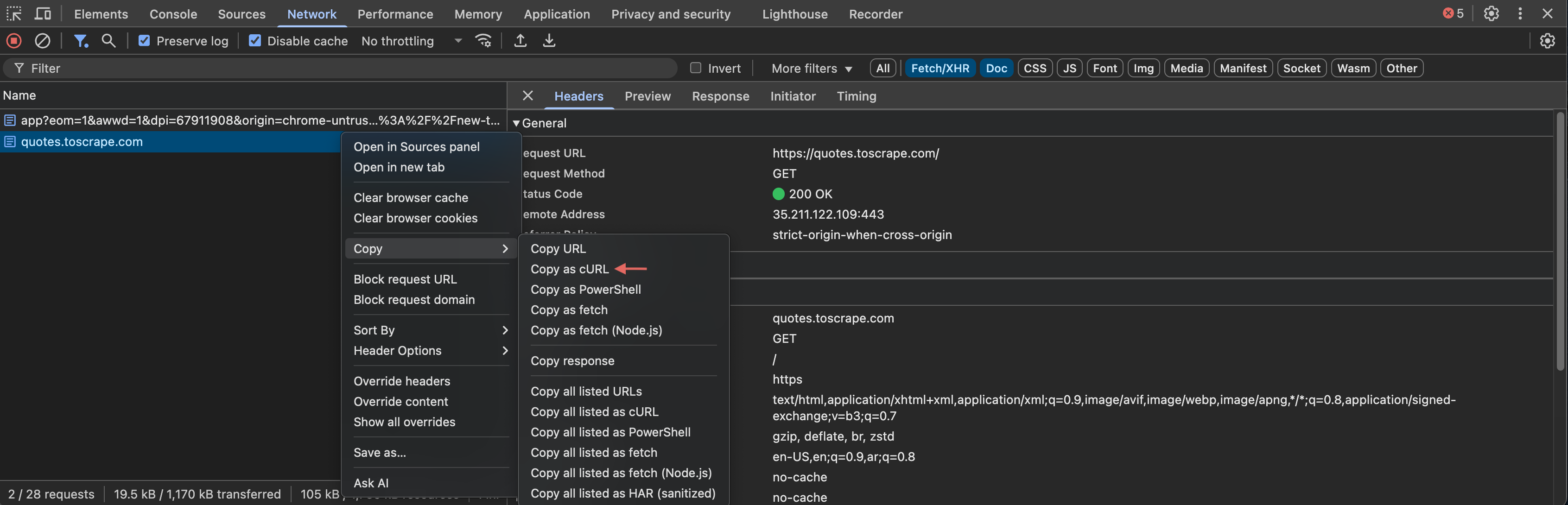
If you just want to test one article quickly, Scrapling’s CLI can be faster than writing a script.
The most useful option here is --ai-targeted:
scrapling extract get "https://example.com/news/123" article.md --ai-targeted
That mode tries to:
- keep the main content
- remove a lot of markup noise
- produce cleaner output for reading or downstream processing
For dynamic article pages:
scrapling extract fetch "https://example.com/news/123" article.md --ai-targeted
For tougher sites:
scrapling extract stealthy-fetch "https://example.com/news/123" article.md --ai-targeted
This is excellent during the exploration phase, when you still want to know whether the site is worth automating properly.
A better body-extraction strategy for real websites
News sites love inconsistency.
So prepare a list of candidate body selectors:
CONTENT_SELECTORS = [
    "article p::text",
    ".article-content p::text",
    ".article-body p::text",
    ".news-content p::text",
    ".post-content p::text",
    ".entry-content p::text",
    ".content p::text",
]
Then try them one by one:
def extract_content(page):
    for selector in CONTENT_SELECTORS:
        texts = page.css(selector).getall()
        texts = [t.strip() for t in texts if t.strip()]
        if texts:
            return "\n".join(texts)
    return ""
This tiny pattern is one of the highest-value tricks in article extraction.
Because the real world does not care about consistent class naming.
The real world enjoys chaos.
Common mistakes you can avoid today
Mistake 1: scraping the listing snippet instead of the full article
Cause:
- you never entered the detail page
Fix:
- always extract the full body from the article page itself
Mistake 2: mixing “related articles” into the body
Cause:
- your content container is too broad
Fix:
- prefer paragraph extraction
- narrow the body container
Mistake 3: missing the publish date
Cause:
- the site stores it in
datetimeor a date-like class
Fix:
- try both
time::textandtime::attr(datetime)
Mistake 4: getting empty content
Cause:
- the page is rendered dynamically
Fix:
- switch to
DynamicFetcher
Mistake 5: getting a verification or anti-bot page
Cause:
- the site is blocking you
Fix:
- switch to
StealthyFetcher - inspect the returned HTML and confirm you are not parsing the wrong page
When the article count grows, move to Spider
If you eventually need to:
- crawl many listing pages
- collect hundreds of articles
- pause and resume work
- structure callbacks cleanly
then it is time to move beyond a single loop and adopt Scrapling’s Spider.
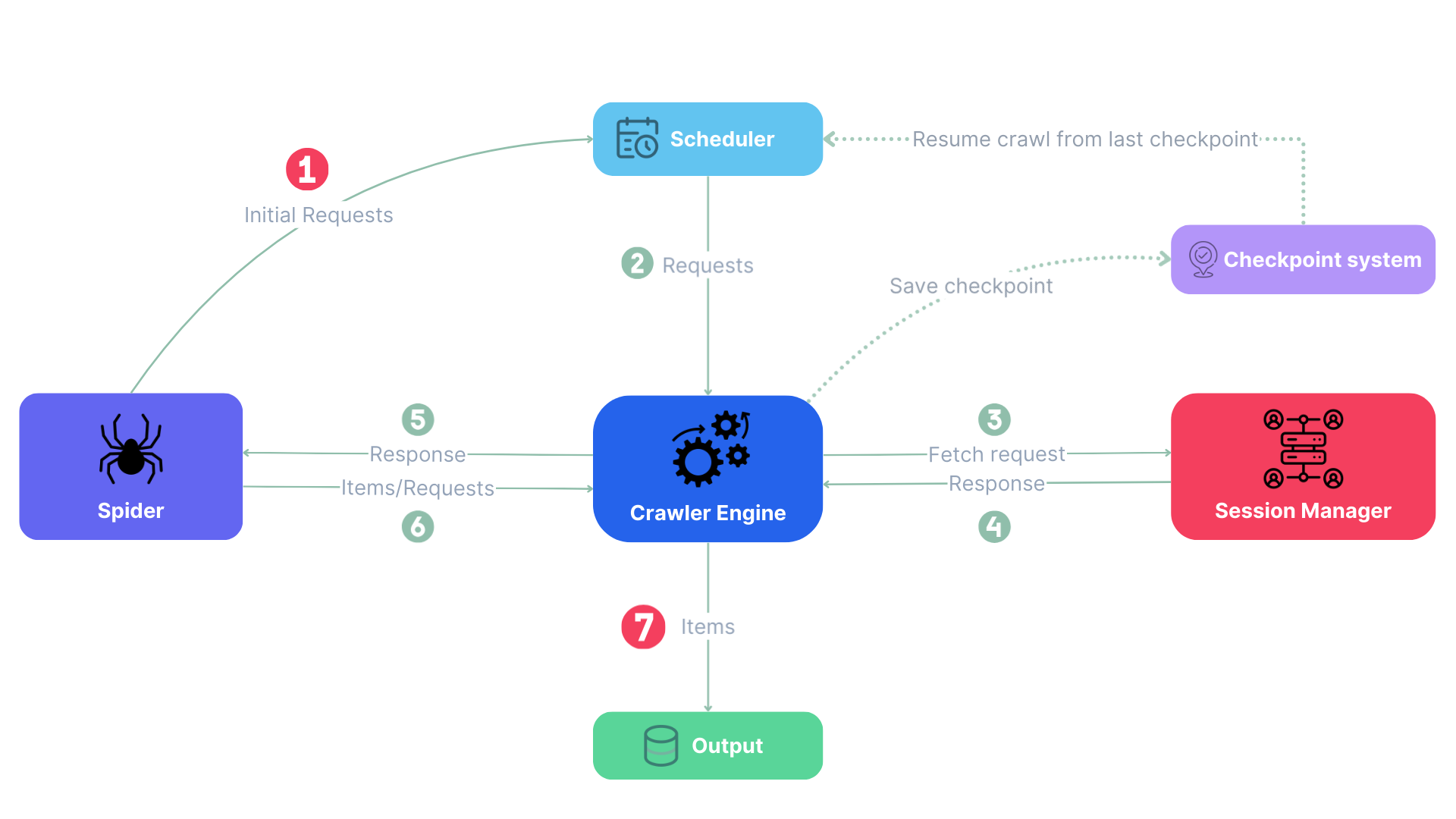
The mental model is simple:
- listing pages yield article links
- detail pages yield article data
- Spider handles the scheduling
For dozens of articles, a script is fine.
For long-term crawling, Spider makes your future self much happier.
Final takeaway: article scraping is about cleanliness, not just access
The hardest part of news scraping is not fetching the page.
It is getting the actual article content cleanly.
A practical order of attack looks like this:
- make one article page work
- stabilize title, date, author, and body extraction
- add listing-page link collection
- only then move into dynamic rendering or stealth if needed
Do not reverse that order.
Otherwise you may end up building a high-speed, highly concurrent, beautifully engineered system that scrapes nothing but ads and recommendations.
And that is not journalism extraction.
That is just automated confusion. 🙂
Reader feedback
What should this post improve or add?
Leave a feature request, improvement idea, or follow-up topic. I review these regularly.
Latest suggestions
No suggestions yet. Be the first one.
For deduplication, only hashes of IP, browser info, and local fingerprint are stored. Raw IP is not stored.